Font Performance Optimization - From Basic to Enhanced Fallbacks

Font Performance Migration: Enhanced Fallback Fonts
Section titled “Font Performance Migration: Enhanced Fallback Fonts”How We Used to Work
Section titled “How We Used to Work”In the past, we used to implement fonts in a basic way, without considering the impact on layout shift and performance:
/* ================================================= Font-Face */
@font-face {  font-family: "Syne";  src: url('/fonts/Syne/Syne-VariableFont_wght.woff2') format('woff2'),       url('/fonts/Syne/Syne-VariableFont_wght.woff') format('woff');  font-style: normal;  font-weight: 400 800;  font-display: fallback or swap;}
@font-face {  font-family: "Hubot Sans";  src: url('/fonts/HubotSans/HubotSans-VariableFont_wdth,wght.woff2') format('woff2'),       url('/fonts/HubotSans/HubotSans-VariableFont_wdth,wght.woff') format('woff');  font-style: normal;  font-weight: 200 900;  font-display: fallback or swap;}
@font-face {  font-family: "Hubot Sans";  src: url('/fonts/HubotSans/HubotSans-Italic-VariableFont_wdth,wght.woff2') format('woff2'),       url('/fonts/HubotSans/HubotSans-Italic-VariableFont_wdth,wght.woff') format('woff');  font-style: italic;  font-weight: 200 900;  font-display: fallback or swap;}
How We Work Now
Section titled “How We Work Now”We discovered a better approach using enhanced fallback fonts with metric overrides to eliminate layout shift:
/* ================================================= Font-Face */
/* fallback fonts */@font-face {  font-family: 'Syne-fallback';  src: local('Trebuchet MS');  ascent-override: calc((925 / 1000) * 100%);  descent-override: calc((275 / 1000) * 100%);  line-gap-override: calc((0 / 1000) * 100%);}
@font-face {  font-family: 'HubotSans-fallback';  src: local('Courier New');  ascent-override: calc((109 / 1000) * 100%);  descent-override: calc((32 / 1000) * 100%);  line-gap-override: calc((0 / 1000) * 100%);}
/* project fonts */
@font-face {  font-family: "Syne";  src: url('/fonts/Syne/Syne-VariableFont_wght.woff2') format('woff2'),       url('/fonts/Syne/Syne-VariableFont_wght.woff') format('woff');  font-style: normal;  font-weight: 400 800;  font-display: swap;}
@font-face {  font-family: "Hubot Sans";  src: url('/fonts/HubotSans/HubotSans-VariableFont_wdth,wght.woff2') format('woff2'),       url('/fonts/HubotSans/HubotSans-VariableFont_wdth,wght.woff') format('woff');  font-style: normal;  font-weight: 200 900;  font-display: swap;}@font-face {  font-family: "Hubot Sans";  src: url('/fonts/HubotSans/HubotSans-Italic-VariableFont_wdth,wght.woff2') format('woff2'),       url('/fonts/HubotSans/HubotSans-Italic-VariableFont_wdth,wght.woff') format('woff');  font-style: italic;  font-weight: 200 900;  font-display: swap;}
Why We Changed
Section titled “Why We Changed”The main problem with the old approach was layout shift. When custom fonts loaded, the text would jump and reposition because system fonts have different dimensions than our custom fonts. This created a poor user experience and hurt our Core Web Vitals scores.
How to Migrate Your Project
Section titled “How to Migrate Your Project”Step 1: Find Values Using FontDrop
Section titled “Step 1: Find Values Using FontDrop”-
Upload your custom font to FontDrop.info.
If FontDrop doesn’t work, you can also try FontForge or Capsize. -
Find the metrics in the ‘data’ panel:

-
Look for “Ascent”, “Descent, “Line Gap” and “unitsPerEm” values
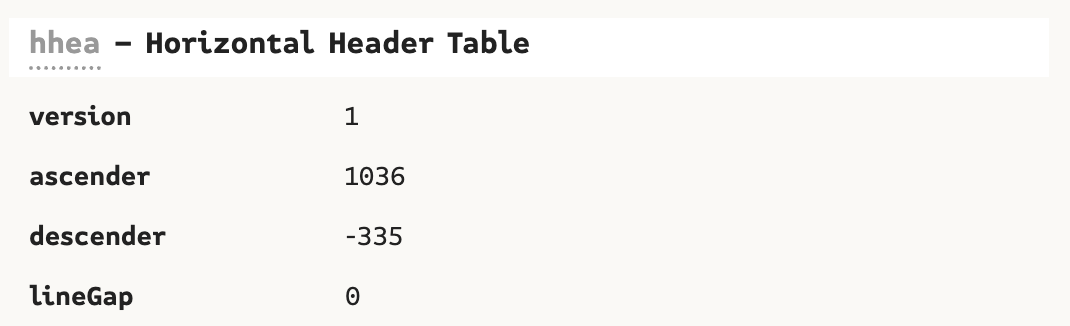

- Example for Syne: Ascent = 1036, Descent = 335, Line Gap = 0
- Note: Even if the value comes out negative, always use it as a positive.
Step 2: Create Fallback Font Definitions
Section titled “Step 2: Create Fallback Font Definitions”Add these fallback font definitions before your existing @font-face declarations:
- Bring the values you found in the previous step. Add the correct value into de calc:
ascent-override = (Custom Font Ascent / unitsPerEm) × 100 descent-override = (Custom Font Descent / unitsPerEm) × 100 line-gap-override = (Custom Font Line Gap / unitsPerEm) × 100Example:
ascent-override: calc((1036 / 1000) * 100%); descent-override: calc((335 / 1000) * 100%); line-gap-override: calc((0 / 1000) * 100%);- Upload the system font you want to use as fallback, see more info here:
- For Syne, we use Trebuchet MS
- For Hubot Sans, we use Courier New
/* Add these fallback fonts */@font-face {  font-family: 'Syne-fallback';  src: local('Trebuchet MS');  ascent-override: calc((1036 / 1000) * 100%);  descent-override: calc((335 / 1000) * 100%);  line-gap-override: calc((0 / 1000) * 100%);}
@font-face {  font-family: 'HubotSans-fallback';  src: local('Courier New');  ascent-override: calc((109 / 1000) * 100%);  descent-override: calc((32 / 1000) * 100%);  line-gap-override: calc((0 / 1000) * 100%);}
Step 3: Update Your Font Stacks
Section titled “Step 3: Update Your Font Stacks”Change your CSS font declarations from:
/* Old way */font-family: "Syne", sans-serif;font-family: "Hubot Sans", sans-serif;To:
/* New way */font-family: "Syne", "Syne-fallback", sans-serif;font-family: "Hubot Sans", "HubotSans-fallback", sans-serif;Step 4: Test and Fine-tune the Results
Section titled “Step 4: Test and Fine-tune the Results”Visual Testing Method:
Section titled “Visual Testing Method:”- Open your site in Chrome DevTools
- Disable cache (right-click refresh → “Empty Cache and Hard Reload”)
- Throttle network to “Slow 3G” in Network tab
- Watch the text as the page loads - it should not jump or shift
- Compare before/after by temporarily removing the fallback fonts
Measurement Testing:
Section titled “Measurement Testing:”-
Use Lighthouse to measure CLS (Cumulative Layout Shift)
- Run audit before and after implementing fallbacks
- Target: CLS score should be < 0.1
-
Use Chrome DevTools Performance tab:
- Record page load
- Look for “Layout Shift” events
- Should see significant reduction
Fine-tuning the Values:
Section titled “Fine-tuning the Values:”If you still see layout shift, adjust the override values:
/* Start with calculated values */@font-face { font-family: 'Syne-fallback'; src: local('Trebuchet MS'); ascent-override: 92.5%; /* Try 90% or 95% if needed */ descent-override: 27.5%; /* Try 25% or 30% if needed */ line-gap-override: 0%;}Testing tip: Use this CSS to temporarily highlight layout shifts:
/* Add this temporarily to see shifts */* { outline: 1px solid red;}Understanding the Override Values
Section titled “Understanding the Override Values”- ascent-override: Controls how tall letters appear (affects spacing above text)
- descent-override: Controls how deep letters go below the line (affects spacing below text)
- line-gap-override: Usually set to 0% for precise control
These percentages make the system font match your custom font’s dimensions, eliminating the jump when fonts load.
Common System Font Metrics for Reference
Section titled “Common System Font Metrics for Reference”The following fonts are the best web safe fonts for HTML and CSS:
- Arial (sans-serif)
- Verdana (sans-serif)
- Tahoma (sans-serif)
- Trebuchet MS (sans-serif)
- Times New Roman (serif)
- Georgia (serif)
- Garamond (serif)
- Courier New (monospace)
- Brush Script MT (cursive)
You can algo check it out here
Troubleshooting
Section titled “Troubleshooting”If layout shift still occurs:
- Double-check your calculations
- Try adjusting values by ±2-5%
- Test on different devices and browsers
- Consider using a different system font as fallback
If fonts look too different:
- Choose a system font with similar character width
- Adjust the
size-adjustproperty if needed - Test with actual content, not just Lorem Ipsum
That’s it! Your fonts will now load smoothly without layout shift.
All of the information below is based on the original article available here