Branching Strategy
Main branches
Section titled “Main branches”- main → Main branch, represents the production state.
- stage → Staging branch, used for testing and integration before production.
General flow
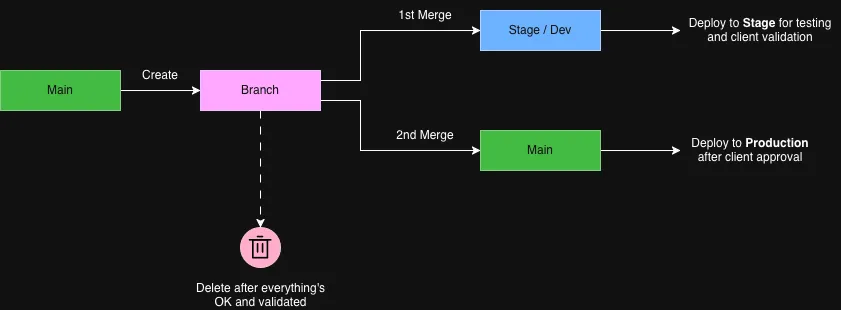
Section titled “General flow”- To deploy to staging, merge your branch into
stageand deploy from there. - When everything is validated, merge your branch into into
mainto release to production. - Once a branch has been merged into
mainand everything is confirmed to be OK, delete it to keep the repository clean.
Naming convention
Section titled “Naming convention”Each working branch follows this format:
<keyword>--<description>--<clickup-id>Example:
feature--post-salesforce--86dxq5zn6Keywords
Section titled “Keywords”| Keyword | Recommended use |
|---|---|
create | Add a new module or page |
feature | Integrate a third-party service or add an endpoint |
fix | Bug fixes |
refactor | Code restructuring without changing functionality |
design | Visual or design changes |
test | Add or modify tests |
Description
Section titled “Description”- Use kebab-case (lowercase with hyphens).
- Keep it short and descriptive.
- Avoid spaces, accents, or special characters.
ClickUp ID
Section titled “ClickUp ID”- Add the ClickUp card ID at the end for task tracking.
- Example:
--86dxq5zn6
Recommended workflow
Section titled “Recommended workflow”- Create a new branch from
main:Terminal window git checkout -b feature--post-salesforce--86dxq5zn6 - Make the necessary changes and commits.
- Open a pull request to
stage. - Once reviewed and approved, merge into
stageand deploy staging. - After successful validation, merge into
main. - Delete the branch once merged into
mainand confirmed OK.
Example branch names
Section titled “Example branch names”create--module-cta-aninmated--86dxq5zn6feature--post-to-salesforce--86dxq5zn6fix--error-slider--86dxq5zn6refactor--php-8-compatible--86dxq5zn6design--update-header-spacing--86dxq5zn6test--animation--86dxq5zn6Reference
Section titled “Reference”Inspired by:
GitHub branching name best practices – dev.to/jps27cse